DSS Agile6.5.7
Publisher Description
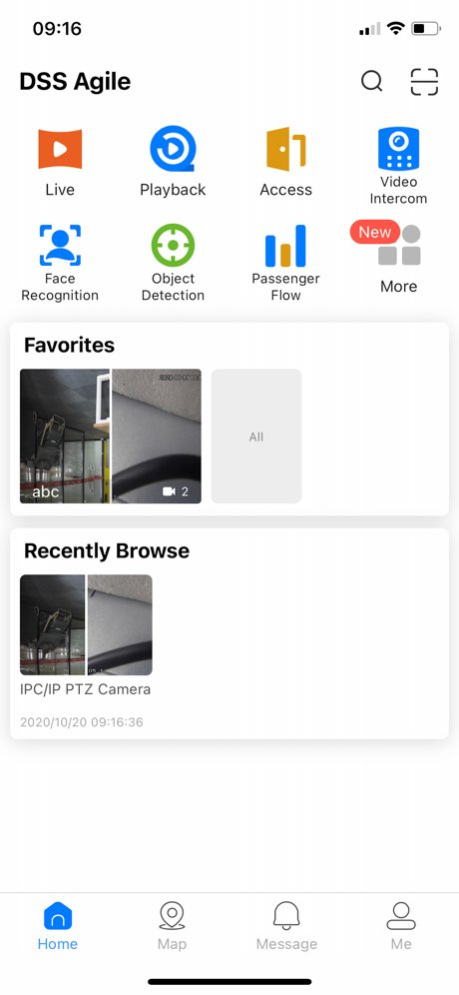


DSS Agile App is a Mobile Client for DSS products below version 8.0.0 (excluding version 8.0.0), including DSS Professional, DSS Express, DSS7016D/DR-S2 and DSS4004-S2. It has a user-friendly UI and offers plenty of experience. You can use DSS Agile to watch live video, video playback, video call,feature recognition, and alarm push notifications anywhere and anytime.
Version History 1、fix bug 6.5.7 08/21/2023 1、fix bug 6.5.6 08/04/2023 1、fix bug 6.5.5 07/31/2023 1.Fix device playback error
2.Surport IPV6 6.05.04 04/27/2021 1.Fix device playback error 6.05.03 03/26/2021 1.Fix the display error of alarm pictures
2.Fix device video prompt error 6.05.02 03/19/2021 1. Fix the video playback module bug 6.05.01 02/05/2021 1. Added login tips.
2. Added simplified version of user's manual and display it in modules.
3. Optimized access control module, and added global configuration page.
4. The detail page of object detection module supports linkage video playback.
5. The map module supports the display of access control devices .
6. Added integrated search, including organization, device, channel, personnel information, and users. 6.05.00 01/22/2021 BUG FIX 6.04.01 01/11/2021 1. Added dark mode.
2. Added face statistics.
3. View Organization Tree.
4. Optimized face recognition and object detection interface.
5. Added temperature to view the temperature of the target monitored by thermal device.
6. Fix bugs 6.04.00 12/09/2020 1. Updated Home interface.
2. Supported playing multiple channels in Recently Browse.
3. Adjusted Alarm Messages interface and search conditions.
4. Added Alarm Host module and supported arming/disarming of subsystems and zones.
5. Fix bugs 6.03.01 10/22/2020 1. Updated Home interface.
2. Supported playing multiple channels in Recently Browse.
3. Adjusted Alarm Messages interface and search conditions.
4. Added Alarm Host module and supported arming/disarming of subsystems and zones. 6.03.00 10/20/2020 1. Added domain user login and account switching.
2. New layout of organization tree for live and playback module.
3. Added four view and PiP modes for video playback.
4. Memory play for multiple channels last viewed through browsing record.
5. UI optimization for face recognition, object detection, and setting modules.
6. Added snapshot in open door history for access module. 6.02.01 08/18/2020 Solve the crash problem in non English environment 6.01.01 07/16/2020 1.Added visitor manager module to create visitor pass code and view visitor records.
2.Improved message module for more convenient operations.
3.Account switching optimization.
4.Added audio switching, brightness and volume adjustment on the live window.
5.UI updates. 6.01.00 06/15/2020 6.00.00 03/24/2020
About DSS Agile
The company that develops DSS Agile is Hangzhou CE-soft Technology Co., Ltd.. The latest version released by its developer is 6.5.7.
To install DSS Agile on your iOS device, just click the green Continue To App button above to start the installation process. The app is listed on our website since 2026-10-07 and was downloaded 3 times. We have already checked if the download link is safe, however for your own protection we recommend that you scan the downloaded app with your antivirus. Your antivirus may detect the DSS Agile as malware if the download link is broken.
How to install DSS Agile on your iOS device:
- Click on the Continue To App button on our website. This will redirect you to the App Store.
- Once the DSS Agile is shown in the iTunes listing of your iOS device, you can start its download and installation. Tap on the GET button to the right of the app to start downloading it.
- If you are not logged-in the iOS appstore app, you'll be prompted for your your Apple ID and/or password.
- After DSS Agile is downloaded, you'll see an INSTALL button to the right. Tap on it to start the actual installation of the iOS app.
- Once installation is finished you can tap on the OPEN button to start it. Its icon will also be added to your device home screen.
Program Details
System requirements
Download information
Pricing
Version History
version 6.5.7
posted on 2026-10-07
Version History 1、fix bug 6.5.7 08/21/2023 1、fix bug 6.5.6 08/04/2023 1、fix bug 6.5.5 07/31/2023 1.Fix device playback error
2.Surport IPV6 6.05.04 04/27/2021 1.Fix device playback error 6.05.03 03/26/2021 1.Fix the display error of alarm pictures
2.Fix device video prompt error 6.05.02 03/19/2021 1. Fix the video playback module bug 6.05.01 02/05/2021 1. Added login tips.
2. Added simplified version of user's manual and display it in modules.
3. Optimized access control module, and added global configuration page.
4. The detail page of object detection module supports linkage video playback.
5. The map module supports the display of access control devices .
6. Added integrated search, including organization, device, channel, personnel information, and users. 6.05.00 01/22/2021 BUG FIX 6.04.01 01/11/2021 1. Added dark mode.
2. Added face statistics.
3. View Organization Tree.
4. Optimized face recognition and object detection interface.
5. Added temperature to view the temperature of the target monitored by thermal device.
6. Fix bugs 6.04.00 12/09/2020 1. Updated Home interface.
2. Supported playing multiple channels in Recently Browse.
3. Adjusted Alarm Messages interface and search conditions.
4. Added Alarm Host module and supported arming/disarming of subsystems and zones.
5. Fix bugs 6.03.01 10/22/2020 1. Updated Home interface.
2. Supported playing multiple channels in Recently Browse.
3. Adjusted Alarm Messages interface and search conditions.
4. Added Alarm Host module and supported arming/disarming of subsystems and zones. 6.03.00 10/20/2020 1. Added domain user login and account switching.
2. New layout of organization tree for live and playback module.
3. Added four view and PiP modes for video playback.
4. Memory play for multiple channels last viewed through browsing record.
5. UI optimization for face recognition, object detection, and setting modules.
6. Added snapshot in open door history for access module. 6.02.01 08/18/2020 Solve the crash problem in non English environment 6.01.01 07/16/2020 1.Added visitor manager module to create visitor pass code and view visitor records.
2.Improved message module for more convenient operations.
3.Account switching optimization.
4.Added audio switching, brightness and volume adjustment on the live window.
5.UI updates. 6.01.00 06/15/2020 6.00.00 03/24/2020
version 6.5.7
posted on 2023-08-21
1、fix bug
version 6.5.7
posted on 2023-08-21
Aug 21, 2023
Version 6.5.7
1、fix bug
version 6.5.6
posted on 2023-08-04
Aug 4, 2023
Version 6.5.6
1、fix bug
version 6.5.5
posted on 2023-07-31
Jul 31, 2023
Version 6.5.5
1、fix bug
version 6.05.04
posted on 2021-04-27
Apr 27, 2021
Version 6.05.04
1.Fix device playback error
2.Surport IPV6
